

What is RAID? What NAS users should know
Hello! Today we explain more about NAS, following our article Synology DS920+ review and tutorial: an easy personal cloud with no monthly fees – E-Express.co.th where we mentioned RAID while creating storage pools and volumes. Let us explain more clearly how the different configurations work.
First, 2 configurations that are not RAID: Basic and JBOD. You can start with a single drive. Basic is the simplest configuration and lets you choose a new setup when adding drives. JBOD manages storage with the areas clearly separated and also allows drives to be added later.
These 2 configurations are not RAID, which combines the storage of at least 2 HDDs or SSDs so they appear as a single space. The first RAID type we will discuss is
RAID 0, or striping. It maximizes drive performance and provides fast access by splitting data into equal parts, without duplicate copies. If a drive fails, all data is lost. For example, RAID 0 with 2 drives of 8 TB gives 16 TB of usable space. It suits users seeking speed and capacity for data that is not critical and can be lost.
RAID 1, or mirroring, writes the same data to both of the 2 drives. If one fails, the data remains, but usable capacity is halved. For example, RAID 1 with 2 drives of 8 TB provides 8 TB of usable space. It suits users who have only 2 drives and prioritize resilience and data protection.
RAID 5, or striping with parity, requires at least 3 drives. It uses capacity equivalent to 1 drive for redundancy, with data divided among drives and parity check bits verifying correctness. One drive can fail without losing the data, but capacity equivalent to 1 drive is unavailable for ordinary storage. For example, RAID 5 with 3 drives of 8 TB provides 16 TB usable. It suits users seeking high speed, large capacity and moderate resilience, tolerating 1 failed drive.
RAID 6, or striping with double parity, needs at least 4 drives. It is similar, but uses capacity equivalent to 2 drives for redundancy. Up to 2 drives can fail at once, at the cost of 2 drives' capacity. For example, RAID 6 with 4 drives of 8 TB gives 16 TB usable. It suits high-speed, large-capacity, highly resilient storage under continuous 24×7 workloads, with a maximum of 2 failed drives.
RAID 10 combines mirroring and striping, bringing together RAID 1 and RAID 0. It needs at least 4 drives and an even drive count. Read/write performance improves and duplicate data is retained, but half the total capacity is used for redundancy. For example, RAID 10 with 4 drives of 8 TB gives 16 TB usable. It suits users who prioritize speed, resilience and important data over maximum capacity.
The final option is a Synology specialty: Synology Hybrid RAID, or SHR. Designed for ease of use and efficient storage, it suits beginners and people combining HDDs of different capacities in a NAS. It offers more flexibility than the conventional RAID types above. With at least 2 drives, it provides redundancy while improving utilization and expanding NAS storage.
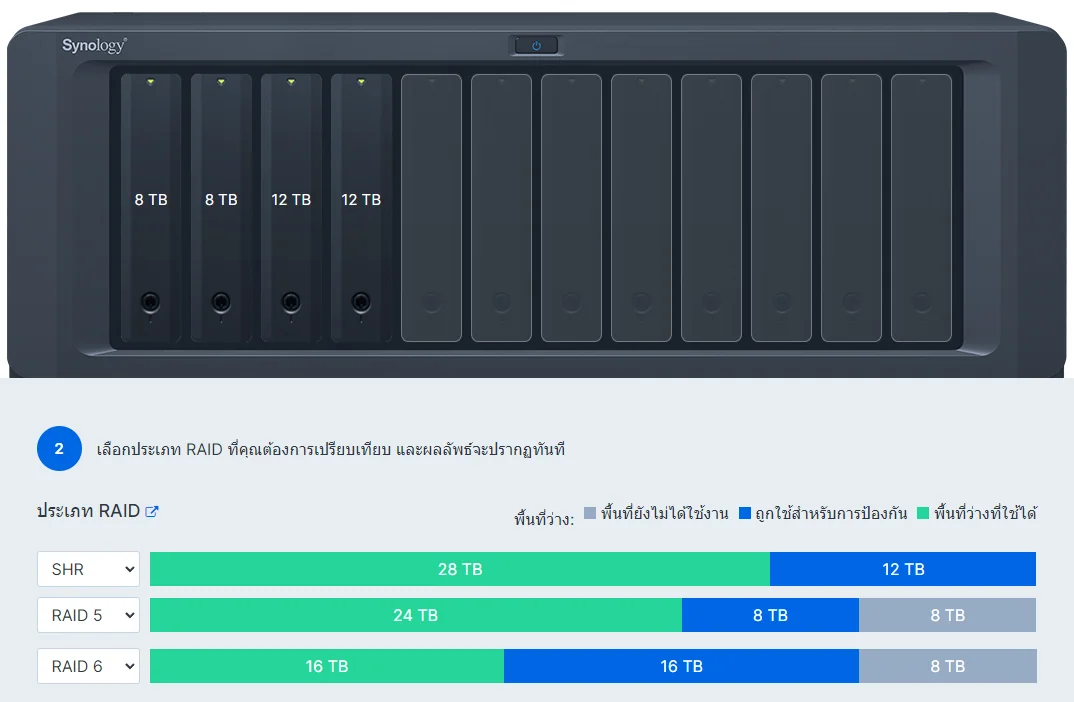
Here is an example of SHR: suppose we have 4 HDDs of different capacities, 8 TB x2 and 12 TB x2.
Usable capacity differs because conventional RAID works from the smallest installed drive size. With RAID 5 and redundancy equivalent to 1 drive, usable space is 8+8+8 = 24 TB, with 8 TB for redundancy. The extra 4 TB above 8 TB on each of the 2 drives of 12 TB becomes 4+4 = 8 TB of unused space.
With RAID 6 and redundancy equivalent to 2 drives, usable capacity is 8+8 = 16 TB and redundancy is 8+8 = 16 TB. Again, the extra 4 TB above 8 TB on each of the 2 drives becomes 4+4 = 8 TB of unused space.
SHR handles drives differently, dividing their capacities into equal sections and protecting each section as shown.
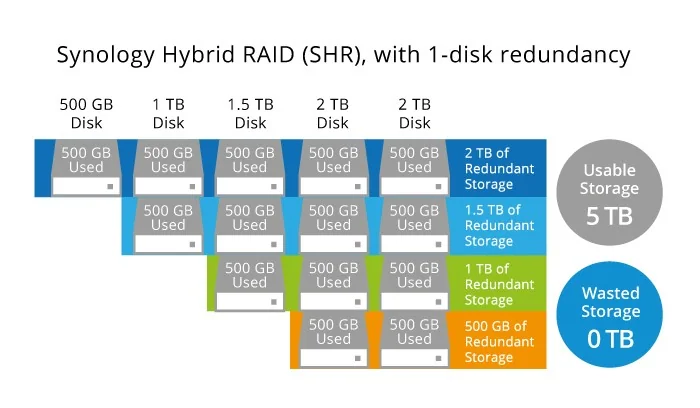
In the first horizontal row, usable space is 4+4+4 = 12 TB with 4 TB of redundancy. The next row also gives 12 TB usable and 4 TB redundant. The final row has 4 TB usable and 4 TB redundant. Total usable space is 12+12+4 = 28 TB, with 4+4+4 = 12 TB for redundancy. SHR therefore reduces unused capacity. Click the link for more RAID calculations. RAID Calculator | Synology Inc.
